
Birthday emails are one of the most profitable tools in email marketing. When a brand reaches out to subscribers on their special day, an email with a gift feels like a genuine present rather than another marketing message cluttering their inbox.
Birthday email campaigns generate significantly higher conversion rates and revenue per email than standard promotional blasts. They help retain current subscribers and protect your customer base from churning to competitors—which is far cheaper than acquiring new users.
Table of Contents
- Why Your Business Needs Customer Birthdates: 4 Key Opportunities
- The ROI of Birthday Emails: Why Retaining Is Cheaper Than Re-engaging
- 5 Types of Birthday Emails: From Basic Ideas to High-Performing Tactics
- 10 Rules for a Successful Birthday Email Campaign
- How to Set Up an Automated Birthday Campaign in NiceSender in 4 Steps
3 Quick Facts About Birthday Emails

1. They generate more revenue than standard promotional campaigns. Personal gifts boost opens, and people are more willing to spend money on their birthday.

2. Nearly two-thirds of businesses miss out on this revenue. Companies either fail to collect birth dates entirely or leave the data idle in their CRM without setting up automated triggers.

3. Celebration discounts are cheaper than win-back campaigns. A birthday perk costs far less than attempting to reactivate lapsed customers with deep discounts.
Why Your Business Needs Customer Birthdates: 4 Key Opportunities
Collecting birthdates just to send a generic electronic postcard once a year is a waste of resources. The true value of this data lies in predictable sales, precise segmentation, and long-term customer retention.
- Predictable demand regardless of seasonality. Unlike Black Friday or the holiday shopping season, customer birthdays are spread evenly across the calendar. Birthday trigger campaigns generate a steady stream of high-converting sales—even during quiet, off-peak months for retail.
- Age-based segmentation. A birthdate automatically assigns a subscriber to an age category. This allows you to tailor your regular campaign offers—avoiding showing youth apparel to older demographics and vice versa.
- A natural reason to re-engage inactive subscribers. If a customer hasn’t purchased in six months, a cold sales email will likely end up in the spam folder. A birthday is a natural, non-intrusive reason to reach out, show appreciation, and bring dormant customers back into your sales funnel.
- Effortless relationship building. Even if a subscriber doesn’t purchase immediately, a personalized gift and warm wishes strengthen brand loyalty. The next time they choose between you and a competitor, they will remember your thoughtful gesture.
Don’t Overwhelm Users at Signup

Do not force users to share their birthdate on your initial website signup form—asking for too much information upfront drastically lowers conversion rates. Collect their email address first, then gather birthdates later through a welcome series, short surveys, or interactive email forms. Motivate them with a clear value proposition: "Share your birthday so we can send you a special treat!"
Need a convenient way to build your subscription forms and capture customer data? Check out our step-by-step guide: Email Subscription Form Builder. You can easily customize fields, set up custom forms, and enable Double Opt-In confirmation emails in just a few clicks.
The ROI of Birthday Emails: Why Retaining Is Cheaper Than Re-engaging
The average celebratory discount in retail sits around 15–20%. For businesses with tight profit margins, giving away a fifth of the order value might seem like a heavy cost. However, when you look at a birthday trigger campaign not as “giving away discounts” but as a customer retention (LTV) strategy, the financial advantage becomes clear:
Retaining an existing customer is significantly cheaper than acquiring a new one or win-back campaigns.
According to research by Harvard Business Review, acquiring a new customer costs 5 to 25 times more than retaining an existing one. Furthermore, boosting customer retention rates by just 5% can increase overall company profits by 25% to 95%.
A 15–20% discount on a birthday is a fair investment to keep an active, paying customer in your database for another year.
Preventing churn instead of paying for expensive win-back campaigns
When companies refuse to offer reasonable discounts to active customers, they often end up offering 30–50% off in re-engagement workflows later on to win back subscribers who have completely gone cold.
A customer is much more likely to buy with a smaller discount while they are still engaged. A 15–20% birthday discount feels valuable to the shopper, pays off through increased Customer Lifetime Value (LTV), and protects your audience from switching to competitors.
Reallocate a portion of your promotional budget from win-back campaigns to birthday automated series. Investing in customers when their brand loyalty is high yields higher revenue with lower discount margins.
5 Types of Birthday Emails: From Basic Ideas to High-Performing Tactics
Let’s break down how brands structure their birthday promotions—and why some emails generate repeat purchases while others go straight to the trash.
1. “It’s the Thought That Counts” (Greetings Without a Gift)
The approach: Sending a digital greeting card with a message like “Wishing you a happy birthday!” or inviting them to shop the new collection at full price. This is common in luxury retail.
Drawbacks: Subscribers expect brands to acknowledge their loyalty with value. A plain card without a gift feels like a formality, and a push to buy at full price looks like an aggressive sales pitch disguised as a holiday message.
How to improve it: If your brand positioning prohibits cash discounts, offer exclusive service upgrades: free express shipping, double loyalty points, early access to a private sale, or a free personal consultation.
2. The Celebratory Promo Code
The approach: Offering a percentage discount (e.g., 20% off) or a fixed voucher (€10 or €20 off) valid for 7 to 30 days.
Drawbacks: Setting an unreasonably high order threshold. For instance, a €10 off orders over €200 offer feels like a trap rather than a gift, forcing the user into unplanned high spending.
How to improve it:
- Lower or remove the Minimum Order Value (MOV). A gift should be easy to claim. Your threshold should not exceed your standard average order value.
- Use psychological framing in the subject line and banner. For lower-cost products, percentage discounts (“Take 20% off”) often sound more attractive. For higher-ticket items, fixed monetary values (“€20 off your next order”) carry higher perceived value.
3. Free Gift with Purchase
The approach: Food delivery and restaurants offer a complimentary dessert or drink with an order, while e-commerce brands offer a full-sized gift, accessory, or branded merch with any purchase.
Why it works: The cost of a physical item to the company is often lower than a direct 20% price cut, but the perceived emotional value for the customer is significantly higher.
4. An Automated Drip Series Instead of a Single Email
The approach: Sending a single email on the exact birthdate—and stopping there.
Drawbacks: People are busy on their birthday. They are receiving messages from family and friends, and a promotional email from a brand can easily get buried in a crowded inbox.
How to improve it: Set up a 3-part automated sequence:
- 3–7 days before: Reach out early with a pre-birthday offer so the customer can plan their purchase in advance.
- On their birthday: A short, warm greeting with their unique promo code.
- 2–3 days before expiration: A friendly reminder highlighting that the offer is expiring soon.
5. Gamification, Timers, and Interactive Content
The approach: Adding animated GIFs (e.g., unwrapping a gift box), countdown timers, or interactive elements (scratch-off promo codes, or selecting a gift inside the email).
Why it works: Interactive content captures attention and boosts Click-Through Rates (CTR). A countdown timer creates genuine urgency, while AMP elements allow customers to interact with the offer directly inside their email client without navigating away.
10 Rules for a Successful Birthday Email Campaign
To ensure your birthday emails drive sales and delight recipients, follow these fundamental practices:
1. Craft subject lines using the formula: [Name] + Occasion + Value. Show clear value before the user even opens the email.
- Weak: “Wishing you a very Happy Birthday! 🎈” (Friendly, but lacks incentive to open).
- Strong: “Alex, here’s €15 off for your birthday 🎁”
Fallback (if names are missing or unverified): Keep it benefit-driven: "A €15 birthday gift is inside 🎁".
2. Enhance your subject line with preheader text. Add terms or expiration details to drive immediate opens: “Your birthday promo code is inside. Valid for 7 days on all items.”
3. Personalize with real-time context, not just a name. Pull dynamic content based on recent subscriber activity:
- Wishlist: Show items they saved over the last 30–60 days.
- Browsing History: Display products from categories they viewed recently.
- Average Order Value: If history is unavailable, highlight bestsellers within their typical price range.
4. Use a single, clear Call-to-Action (CTA) button. Generic buttons like “Learn More” or “Visit Our Website” underperform. Use benefit-driven copy: “Claim My €15 Gift”, “Get My Birthday Treat”, or “Apply Promo Code”.
5. Make promo codes easy to copy. Don’t force mobile users to manually memorize or type random characters. Highlight the code visually and add a single-tap “Copy Code” button.
6. Set clear expiration dates. A gift without a deadline gets put off and forgotten. The sweet spot for a birthday voucher is between 7 and 14 days. State the terms explicitly: “Your 20% discount is valid through August 31st on all items excluding Sale items.”
7. Set up “Quiet Hours” for regular broadcasts. Configure your email automation platform to suppress subscribers receiving birthday series from receiving routine marketing blasts for 3 to 5 days. This keeps your personal gift from getting lost in general promotional noise.
8. Optimize layouts for mobile devices. Over 70% of birthday emails are opened on smartphones on the go. Ensure your banner and main CTA button fit above the fold. Use font sizes of at least 14–16px and make CTA buttons at least 44px tall for easy tapping.
9. Send a reminder email 48 hours before expiration. Include a final trigger email two days before the code expires. The subject line should emphasize scarcity: “Alex, your €15 birthday reward expires in 48 hours!” This single follow-up often accounts for up to 40% of total revenue generated by the automated series.
10. State restrictions clearly and concisely. Put key terms in clear language in the email footer: “Discount cannot be combined with other promotions or applied to Sale items.”
How to Set Up an Automated Birthday Campaign in NiceSender in 4 Steps
Setting up an automated birthday campaign is easier than it sounds. You won’t need to manually export list files every morning—the email marketing platform handles the delivery automatically according to your setup.
Step 1. Check Your Account Time Zone
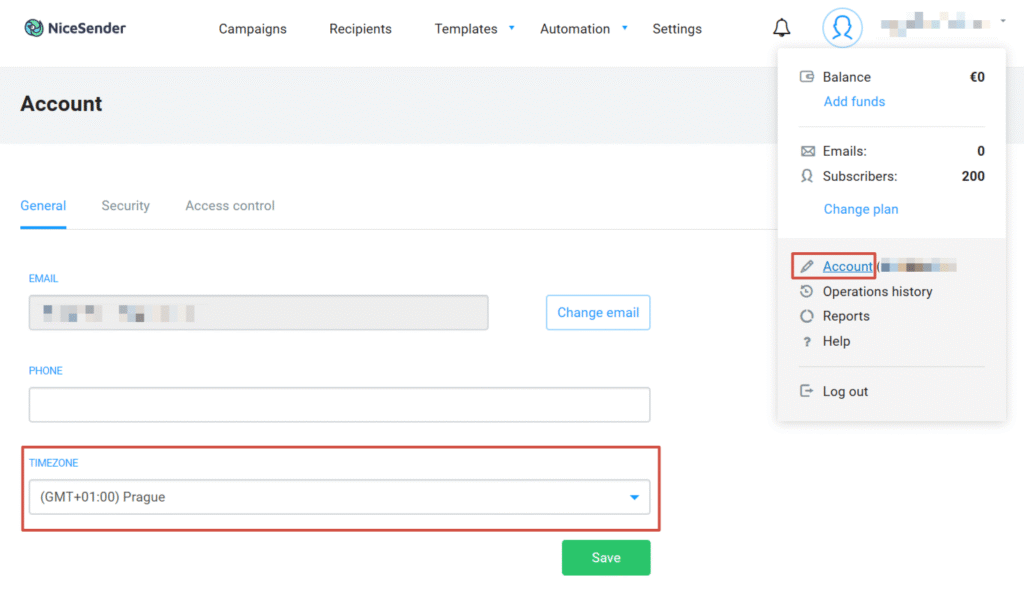
All email triggers fire based on the time zone specified in your profile settings. Click your profile icon in the top right corner, navigate to Account, and under General Settings, ensure the Time Zone matches your operational region.
Step 2. Select a Pre-Built Workflow
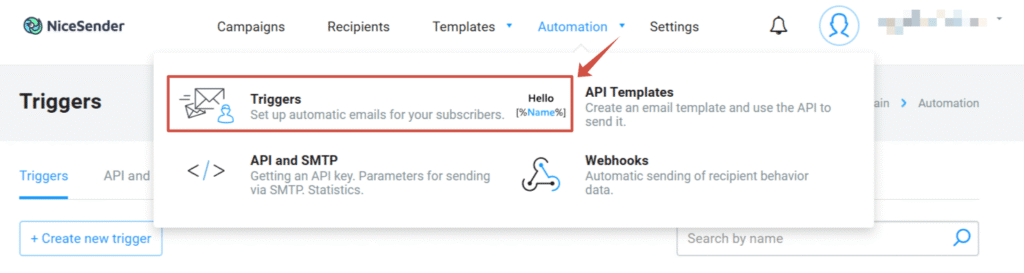
Go to Automation → Triggers.
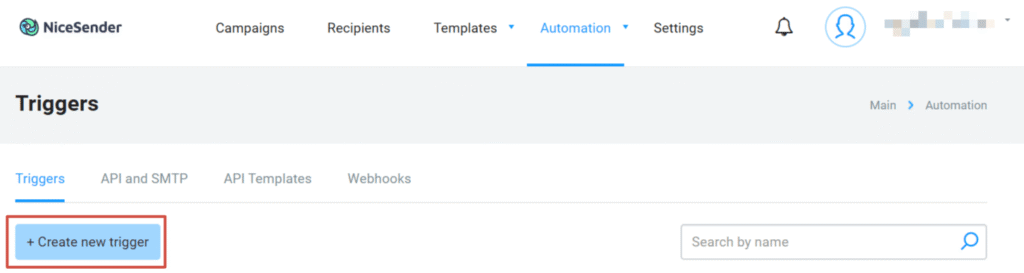
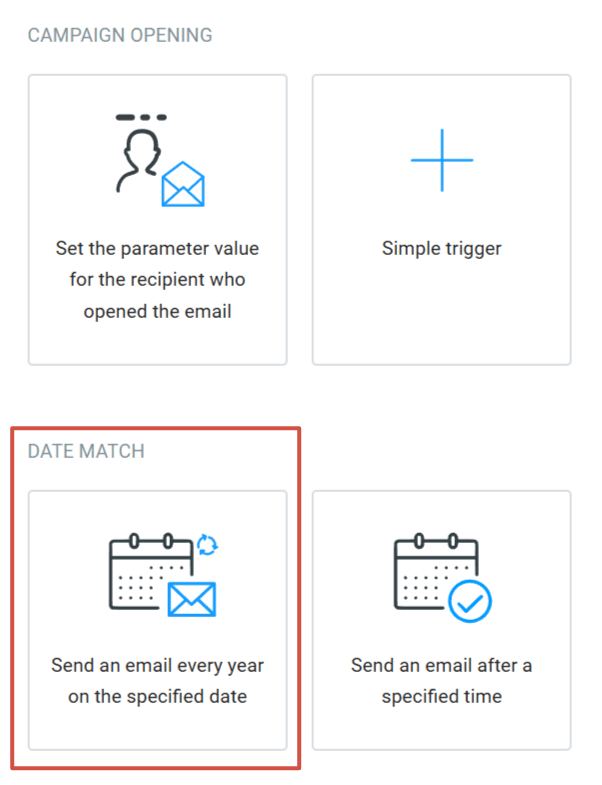
Click + Create new trigger, and under the Date match category, select the pre-built template: “Send an email every year on the specified date”. The automation logic is already structured for you.
Step 3. Configure Trigger Parameters
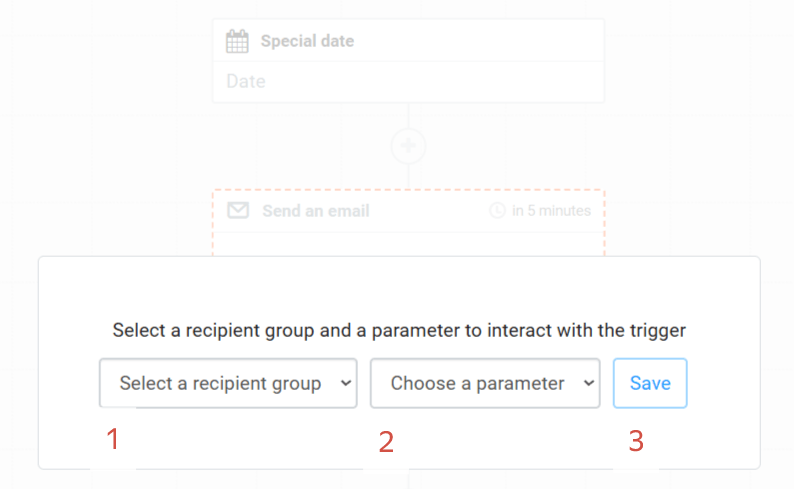
1. In the configuration window, select your target recipient group and the birthday parameter, then click Save.
2. Click on the Special date node in the visual builder and set your preferred Start time (e.g., 9:00 AM or 10:00 AM) so the email arrives right around the recipient’s morning coffee.
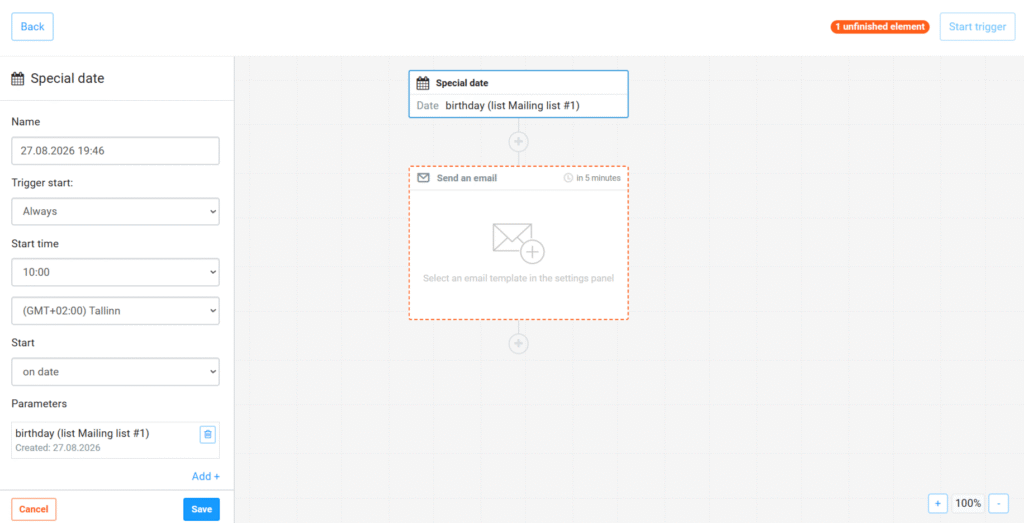
Note: Birthdate parameters sync automatically to NiceSender via CRM integrations, subscription forms, or file imports. You don't need to capture the birth year—the system automatically triggers based on the month and day every year.
Step 4. Assign Your Email Template and Launch
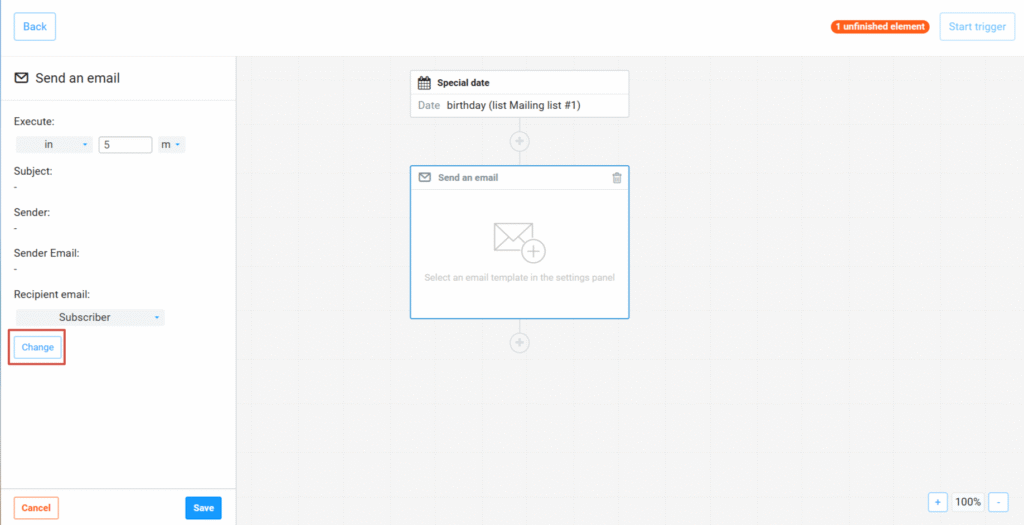
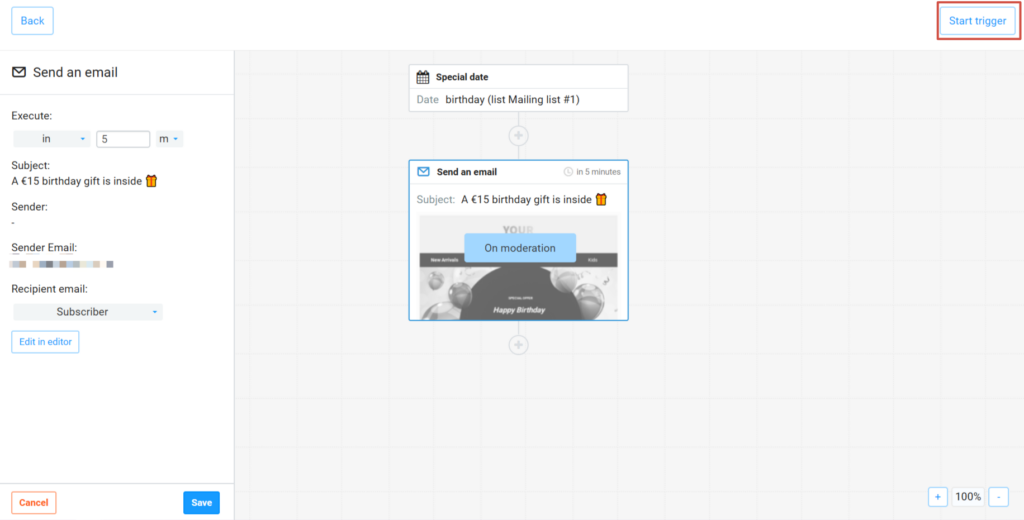
1. Click on the Send an email block and select the Change button. You can leave the default 5-minute send delay as is.
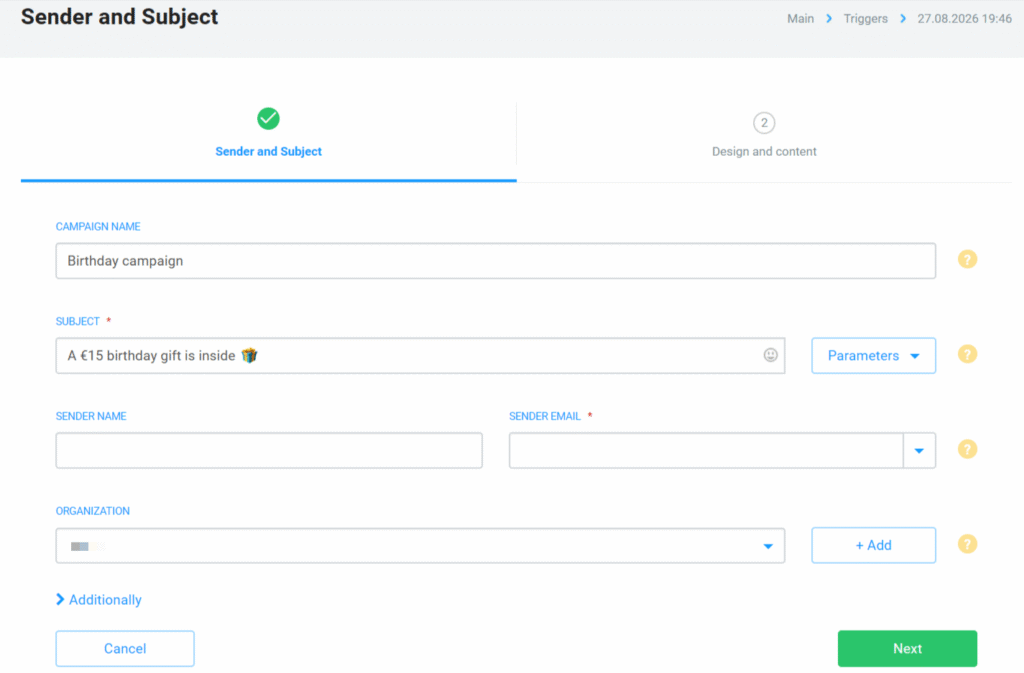
2. Fill in your parameters as you would for a simple campaign: enter your subject line (e.g., “A €15 birthday gift is inside 🎁”), sender name, and sender email.
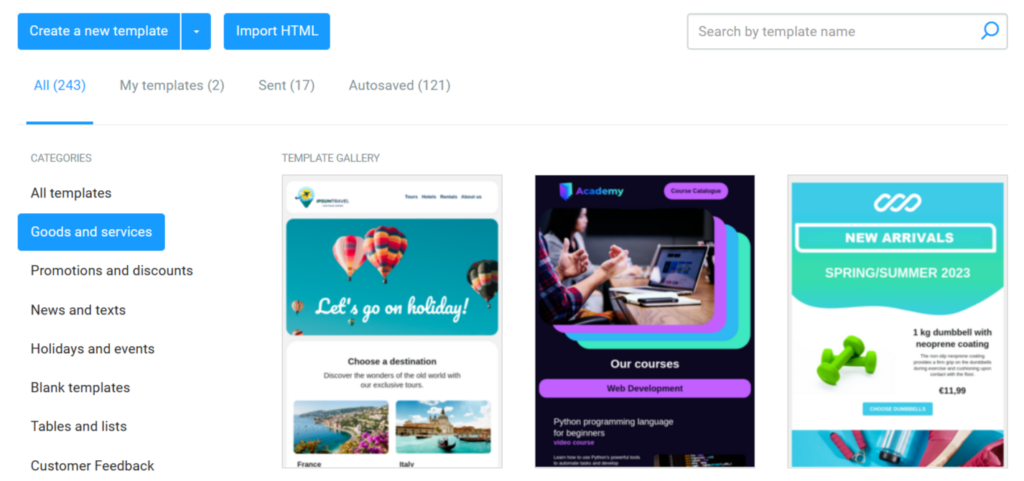
3. Choose a ready-made template from the gallery, tailor the text to fit your brand voice, or create a new one. Click Save.
4. Once your template passes automated moderation, click Start trigger.
You’re all set! NiceSender will now automatically deliver your birthday special offers to your customers on time.
Need assistance setting up your automation?

Our support team is always here to help. Reach out via the live chat in your NiceSender dashboard, and our technical specialists will help you verify your parameters or build custom workflows.
A well-crafted birthday campaign creates memorable customer experiences, increases repeat sales, and drives long-term customer retention without increasing your ad spend.
Set up your automated birthday campaign in NiceSender today.